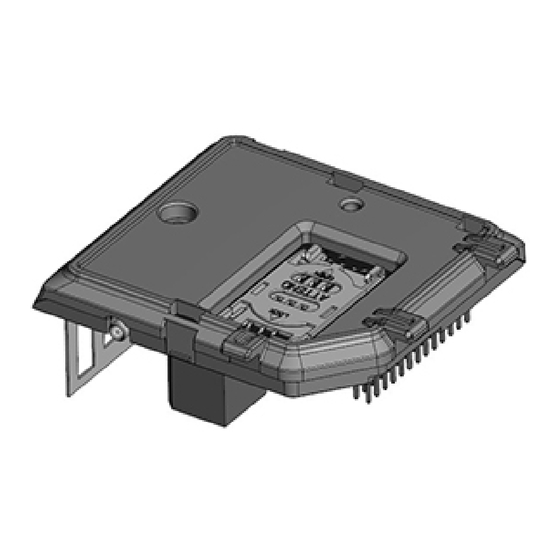
Visonic WCDMA-3G PG Instructions D'installation
Module pour centrales powermaster
Les langues disponibles
Les langues disponibles
WCDMA-3G PG2
Internal WCDMA-3G module for PowerMaster control panels
1. INTRODUCTION
The internal WCDMA-3G module enables the PowerMaster control panel to
operate over a GSM/GPRS/UMTS cellular network. The WCDMA-3G
model is optional and can be installed in any of the following control panels:
•
PowerMaster-10 G2, see figure 1a for details.
•
PowerMaster-30 G2, see figure 1a for details.
•
PowerMaster-33 G2, see figure 1a for details.
•
PowerMaster-360R, see figure 1b for details.
2. INSTALLATION
Fig. 2.1 WCDMA-3G PG2 module mounting
PowerMaster-33 G2
A. WCDMA-3G PG2 module
*PowerMaster-33 G2 only
Fig. 2.3 WCDMA-3G PG2 module mounting PowerMaster-360R
D-307122 WCDMA-3G PG2 Installation Instructions
Fig. 2.2 WCDMA-3G PG2 module mounting
PowerMaster-10 G2 and PowerMaster-30 G2
B. Front unit
C. *Leading ribs
Installation Instructions
Fig. 1a WCDMA-3G PG2
A
B
1
D. *Leading slot (1 of 2)
Fig. 1b WCDMA-3G PG2
1. Release screws.
2. Remove front unit.
3. Plug in the WCDMA-3G
module and fasten it with the
screw.
4. For PowerMaster-33 G2,
ensure that the two leading
slots (D) on both sides of the
module slide along the two
leading ribs (C) on the front
unit.
1. Use a coin or 3 mm flathead
screwdriver to rotate the lock
by 90 degrees counter
clockwise to the unlocked
position.
2. Use minimal force to pull the
panel from the base.
3. Plug in the WCDMA-3G
module and fasten it with the
screw.
1
Table des Matières

Manuels Connexes pour Visonic WCDMA-3G PG


Sommaire des Matières pour Visonic WCDMA-3G PG
- Page 5 WCDMA-3G PG2 Instructions d'installation Module WCDMA-3G pour centrales PowerMaster 1. INTRODUCTION Le module WCDMA-3G interne permet à la centrale PowerMaster de fonctionner sur un réseau cellulaire GSM/GPRS/UMTS. Le modèle WCDMA-3G est proposé en option et peut être installé sur l'une des centrales suivantes : •...
-
Page 6: Insertion De La Carte Sim
Insertion de la carte SIM 1. Faites coulisser le couvercle supérieur 2. Ouvrez le couvercle Fig. 3 Insertion de la carte SIM 3. Alignez la carte SIM sur le couvercle (faites attention au sens) 4. Faites glisser la carte SIM à l'intérieur du couvercle 5. -
Page 7: Caractéristiques Techniques
3. CARACTÉRISTIQUES TECHNIQUES Modem Ports UE910 EUR pour le WCDMA-3G 433 et WCDMA-3G 868, 2 ports UART UE910 NAR pour le WCDMA-3G 915 fabriqué par TELIT Port audio analogique symétrique Communication Voix, données, SMS Types de CODEC GSM : FR, HR, EFR, AMR WCDMA : AMR Tension de 3,4 –... - Page 8 GARANTIE Visonic Limited (le "Fabricant") garantit ce produit (le "Produit") uniquement à l'acquéreur original ("Acquéreur") contre tout défaut de fabrication et de matériaux dans des conditions normales d'utilisation EN AUCUN CAS LE FABRICANT NE SERA TENU RESPONSABLE DE DOMMAGES QUELS QU'ILS pendant douze (12) mois après la date de livraison par le Fabricant.